WEEG SSVEP game
A portable, wireless 8-channel EEG system with SSVEP-based BCI game and real-time signal processing software
The WEEG system was designed and built by Bob Vo, a senior Biomedical Engineering student at International University (Vietnam National University HCMC), as his capstone project. My contribution was to put the system to work as a BCI: I built the offline spectral analysis tool, the SSVEP stimulus game that served as the actuator, and designed the TCP/IP signal transmission and synchronization layer connecting the MATLAB signal processing backend to the Python game frontend.
The project reached the Finals of the BES-SEC Design Award at the 16th International Conference on Biomedical Engineering (ICBME 2016), Singapore, 2016.
The WEEG Hardware
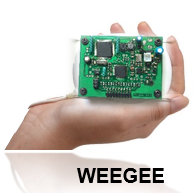
WEEG is a compact, wireless 24-bit 8-channel EEG recording system. Its key design goals were portability and low cost, targeting applications where traditional tethered clinical systems are impractical, such as ambulatory monitoring and resource-limited clinical settings.
Specifications:
- Form factor: 6.4 cm x 3.5 cm, worn in a pouch holster
- Cost: Under $200 in components, compared to thousands of dollars for clinical EEG systems
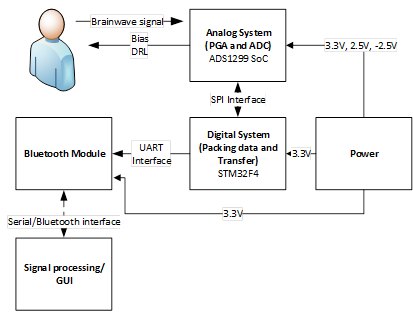
- Resolution: 24-bit ADC (ADS1299), compared to the 16-bit precision typical of consumer-grade devices
- Sampling rate: 500 samples per second across 8 simultaneous channels, exceeding most consumer EEG devices
- Connectivity: Bluetooth or serial interface to PC or smartphone
- Battery: 3.7V / 1000 mAh lithium polymer, drawing ~30 mA at steady state, good for approximately 24 hours
- Microcontroller: ARM Cortex-M4 (STM32F4), making the device self-sustained without requiring a tethered host for processing
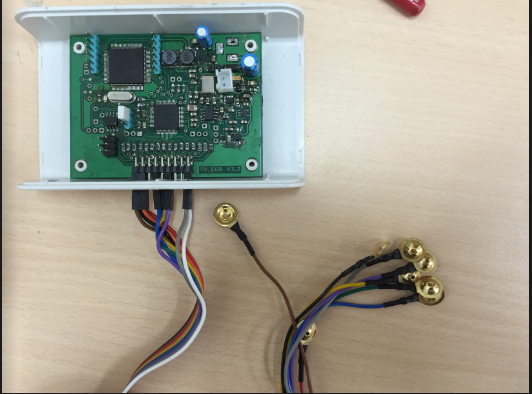
The core ADC is the Texas Instruments ADS1299, a purpose-built chip for biopotential measurement. A buck/boost converter maintains stable system voltage regardless of battery charge state. Standard gold-cup wet electrodes are used for signal acquisition, connected via a 0.1” female header to save PCB space.
Signal Processing Software
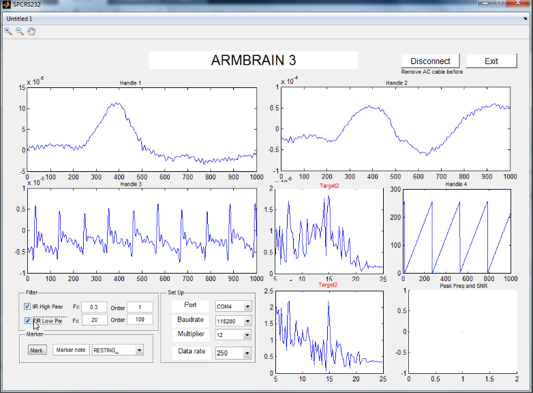
The signal processing software package, WEEG SigPro, runs on the host PC and provides both real-time online monitoring and offline spectral analysis.
Online Recording and Processing GUI
The online GUI connects to the WEEG device over Bluetooth or serial, streams all 8 EEG channels in real time, and displays ongoing signals alongside spectral density plots for user-selected channels. A built-in filter panel lets the user configure IIR or FIR bandpass filters and tune their parameters for the application at hand, without restarting the session.
My Contribution: Offline Analysis, SSVEP BCI Game, and Signal Transmission
My role was to build the offline analysis tooling, the BCI actuator, and the communication infrastructure that tied the EEG system to it.
Offline Spectral Analysis Tool
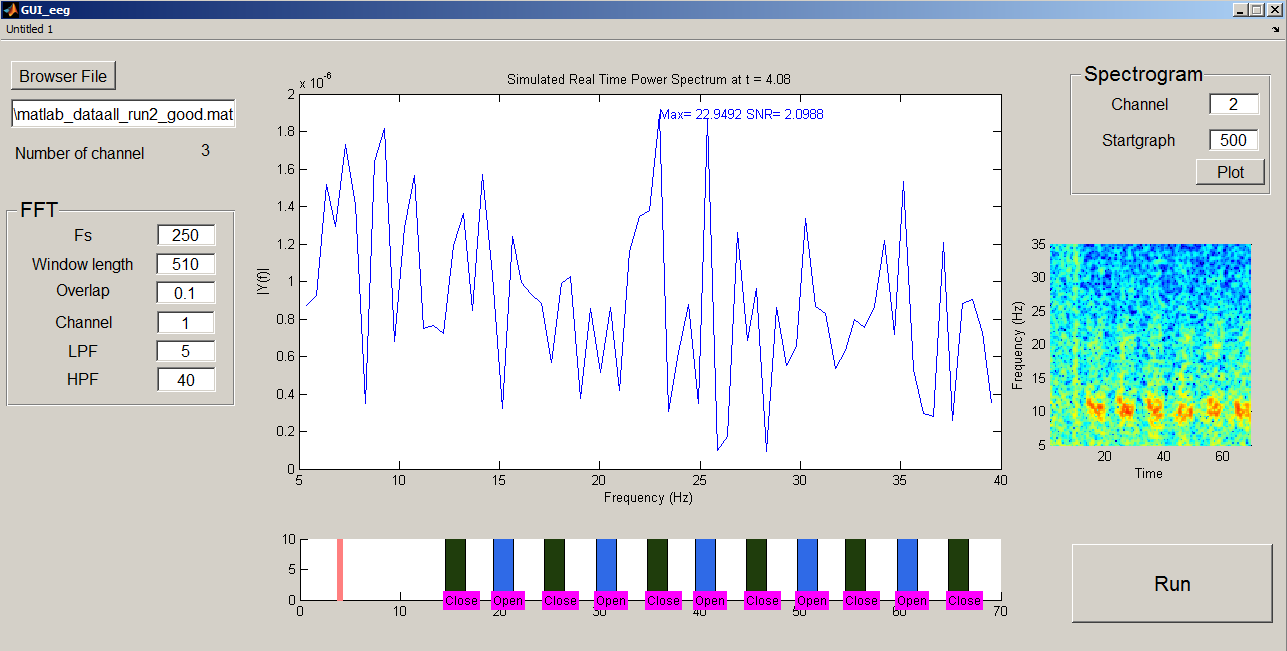
The offline tool is designed for post-hoc exploration of recorded sessions in the frequency domain. The recommended workflow starts with a full-session spectrogram to get a broad view of frequency content over time, then zooms into individual trial windows to inspect how the spectrum responds to stimuli. Event labels are overlaid on the spectrogram so the user can correlate neural responses to experimental conditions.
The tool ingests .mat files in EEGLAB format (an ALLEEG structure with data, srate, and event fields), making it compatible with the broader EEGLAB ecosystem.
Background: SSVEP
As covered in the [Primer] Brain-Computer Interfaces Using EEG, SSVEP (Steady-State Visually Evoked Potential) is an EEG paradigm where a flickering visual stimulus at a fixed frequency $f$ Hz elicits a brain oscillation at exactly that frequency over the occipital cortex. A user selects a command by gazing at the corresponding flickering target. Detection is straightforward: the system identifies which stimulus frequency dominates the occipital EEG spectrum using an FFT or canonical correlation analysis. SSVEP requires no training and supports multiple simultaneous commands, one per stimulus frequency.
The “Find Princess” Game
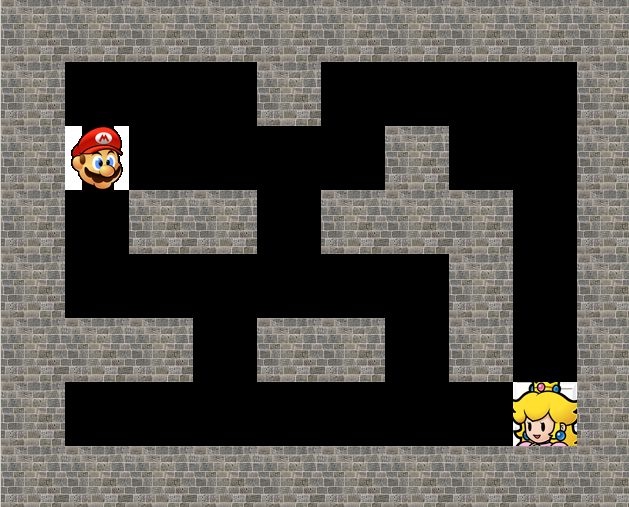
I built the SSVEP actuator as a maze navigation game in Python using Pygame, called Find Princess. The player character (Mario) starts at a fixed position in a tile-based maze and must navigate to reach the target (Princess Peach). Movement in four directions (up, down, left, right) is controlled entirely by SSVEP: four flickering stimuli, each at a distinct frequency, are displayed on screen. The user gazes at the stimulus corresponding to the desired direction, and the decoded BCI command moves the player one tile in that direction.
The game is grid-snapped, meaning each movement command advances the player by exactly one tile (64 px). Collision detection prevents the player from entering wall tiles, so navigation requires genuine spatial reasoning and controlled gaze. A reward graphic is shown when the player reaches the target.
Signal Transmission and Synchronization
The WEEG signal processing pipeline runs in MATLAB, while the game runs in Python. I designed the TCP/IP bridge connecting the two processes. The MATLAB GUI decodes the SSVEP command from the incoming EEG stream and sends a single-byte command code (1 = up, 2 = right, 3 = down, 4 = left) over a TCP socket to the Python game server listening on port 55000. The game’s UDPRecv class runs on a background thread so that socket I/O does not block the Pygame render loop, and the main game thread polls a shared outData variable updated by the receiver thread.
This architecture separates the signal processing and rendering concerns cleanly: MATLAB handles all EEG decoding and the game is a pure actuator that responds to decoded commands, with no EEG awareness of its own.
The two videos below show the TCP/IP connection procedure and a live demo of the full system, including SSVEP-driven maze navigation starting at the 2:10 mark.